PostThisDeal may earn a commission from some links on this page. It never changes the price you pay or which shops we suggest. Tools named here that we don’t own are described as we found them in November 2026; features change, so check each one before you rely on it.
You saw it on a friend’s shelf, in a TikTok, in a hotel lobby or on a store shelf for more than you wanted to pay. Now you want two things: where to buy it, and whether that’s the best price. This guide is the shortest path to both, whatever you start with: a photo, a screenshot, a link, a barcode or just a name.
We built PostThisDeal Lens for exactly this job, and this guide shows when to use it, when Google, Amazon or Pinterest do better, and the checks that stop you overpaying or buying a fake. Bookmark it: it’s the one page you need before you buy anything.
Key takeaways
- Start from what you have. A photo or screenshot → a visual search (Lens, Google Lens). A link or model number → compare the same model across shops (Deal Lens). A barcode → scan it (Store Lens).
- Identify before you compare. The exact model number, size and colour decide the price; “looks the same” is how people overpay or get the wrong item.
- Compare the total, not the sticker. Shipping, tax, membership fees and return costs change which shop is cheapest.
- Check the price is real. Price history (Google price insights, Keepa or CamelCamelCamel for Amazon) shows whether “40% off” is a real drop.
- Too cheap is a warning, not a deal. New shop, no contact details, only odd payment methods: walk away.
What do you have? Start here
Pick the line that matches what’s in front of you. Each one jumps to the right tool and the section below that explains it.
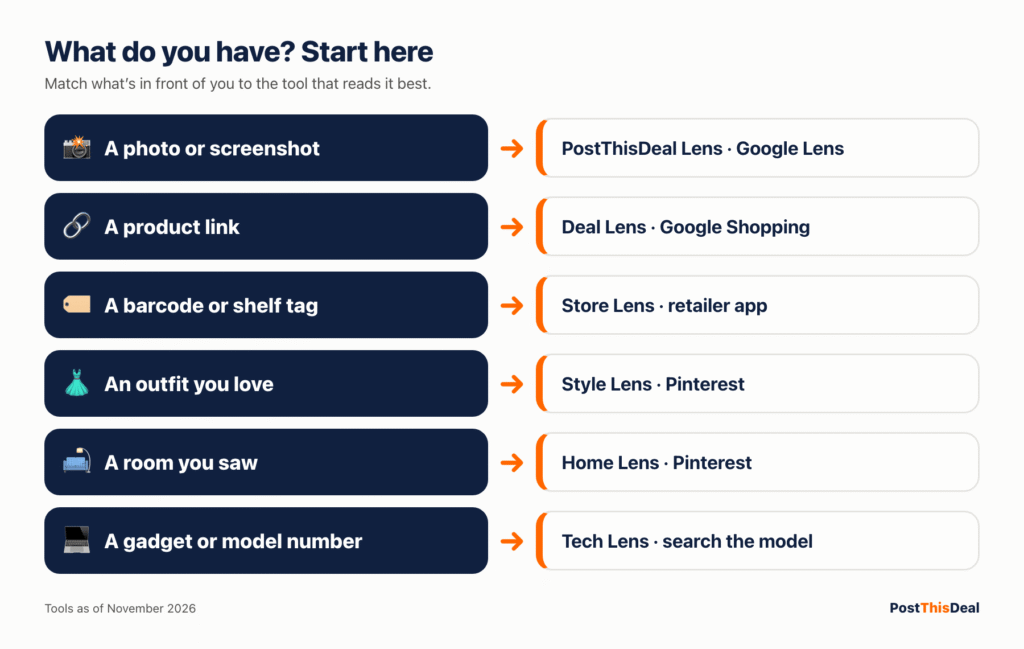
A photo or screenshot
Point your camera at it or upload the picture. Lens reads the product and finds shops selling the same item or close matches.
A product link
Paste the link and compare what shops charge for the same model, with shipping where it’s stated.
A barcode or shelf tag
In a store? Scan the barcode or photograph the price tag and see if it costs less online before you pay.
An outfit you love
Find similar pieces, affordable first, and rebuild the whole look within your budget.
A room you saw online
Add the picture and a budget: Home Lens finds similar sofas, lighting and decor, with a total for the room.
A gadget or a model number
Identify the exact model from a photo or label and compare offers for that model, new and refurbished apart.
The 60-second method that works for anything
Every good buying decision follows the same five steps. Skipping one is how people pay too much, buy a knock-off or get stuck with a return they can’t make.
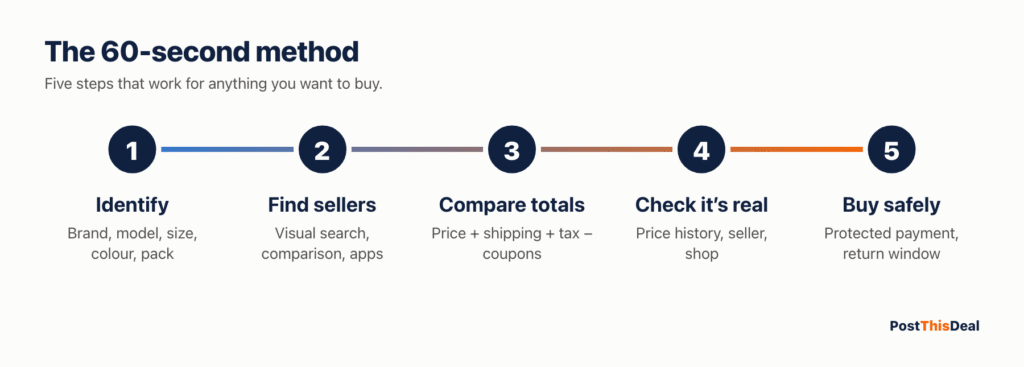
1Identify it exactly. Brand, model number, size, colour, pack count. For tech and appliances, the model number on the box or label is everything; two TVs that look identical can be a year apart in features and price.
2Find every seller. Use a visual search for photos, a shopping comparison for names and links, and the retailer’s own app for barcodes.
3Compare the total. Price + shipping + tax − coupons you can actually use. Note memberships (Prime, Walmart+, a warehouse club) and minimum orders.
4Check it’s real. Is the “was” price genuine? Is the seller the brand, the retailer or a marketplace third party? Is the shop itself legitimate?
5Buy safely. Pay with a method that offers purchase protection, keep the confirmation, and know the return window before you click.
1. Find where to buy something from a photo or screenshot
Visual search has become very good at products. The trick is knowing which tool sees which kind of item best, and taking a picture it can read.
PostThisDeal Lens: the product, not just the picture
PostThisDeal Lens is built for shopping intent: when you add a photo of a jacket, you want the jacket (or one like it) from a real shop, not a page of similar images. Lens separates exact matches (the same product, confirmed by a barcode or a brand and model), likely matches and similar items, shows each shop’s own price and link, and only calls something “best” among the offers it actually checked. It never pretends a look-alike is the original. How Lens works explains exactly how it reads a picture and orders results.
There are specialist versions for the jobs where generic search fails: Style Lens for clothes and outfits, Luxury Lens for designer pieces (new retail compared with pre-owned, and never an authenticity claim), Home Lens for rooms and furniture, Tech Lens for exact models and Store Lens for the shelf in front of you.
Other visual search tools worth knowing
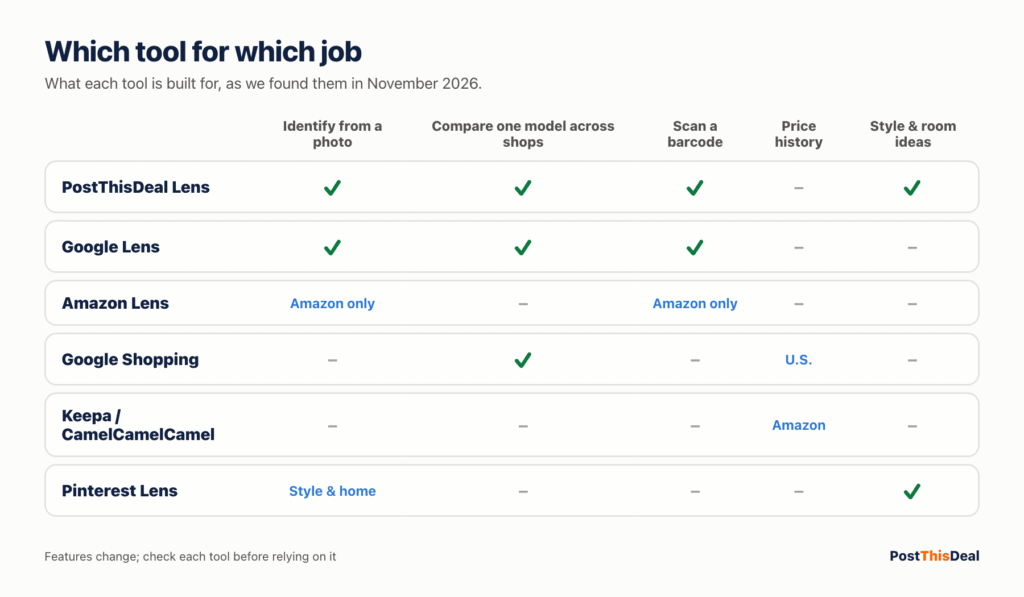
- Google Lens. Built into the Google app, Chrome (right-click an image → search with Google Lens) and many Android phones. Huge index and strong at reading text and logos; shopping results come from Google’s merchant listings. Recent coverage reports in-store price comparisons for some products in the U.S.
- Amazon Lens. The camera icon in the Amazon Shopping app searches Amazon’s catalogue from a photo, an upload or a barcode; Amazon added a live, point-your-camera mode (Lens Live) in 2025. Useful when you already want to buy on Amazon, but it only shows Amazon.
- Pinterest Lens. Strongest for style and home inspiration, and for “more like this” when there’s no exact product to find.
- Bing Visual Search. Microsoft’s equivalent; worth a second opinion when other tools come back empty.
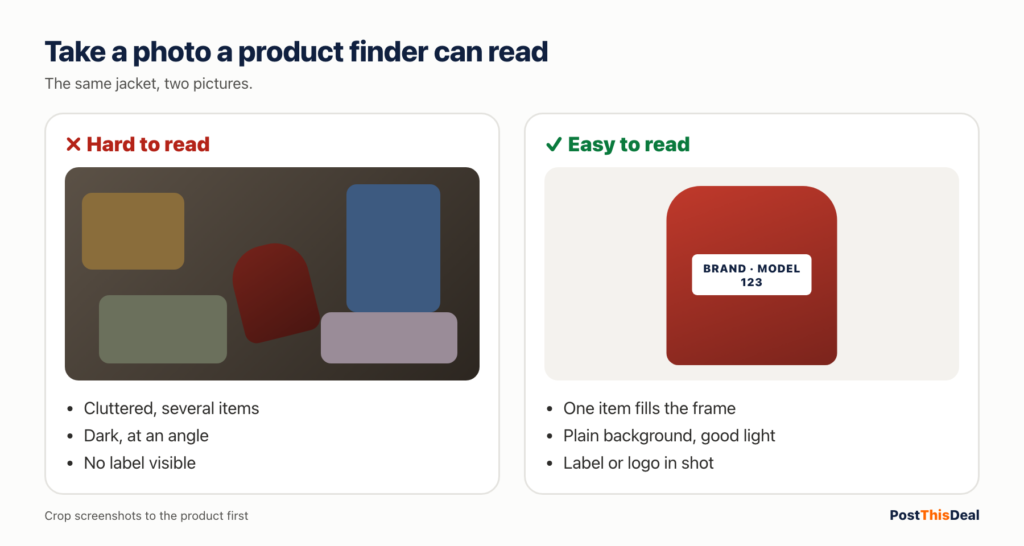
How to take a photo a product finder can actually read
- Fill the frame with one item. Crop out the room, the people and the other products.
- Shoot the label, logo or model number when there is one. Text identifies a product faster than shape.
- Plain background, good light, straight on. Avoid strong shadows and reflections.
- Screenshots work: crop to the product first, and take a second screenshot of any caption that names it.
- For clothes, photograph the fabric and details (buttons, stitching, a print) as well as the whole piece.
Identity first. A visual search can name a look-alike as the original. Before you compare prices, confirm the brand and model from a label, the box or the seller’s product page.
2. Got a link or a product name? Compare the same model everywhere
When you know what it is, the job is finding every shop that sells the same thing. The same name can cover several sizes, colours, pack counts and model years, so the details matter more than the headline price.
- Search the model number, not the marketing name. “Ninja AF101” finds the exact air fryer; “Ninja air fryer” finds forty.
- Use the barcode number (UPC/GTIN) when you have it. It identifies one exact product across shops.
- Paste the link into Deal Lens. It reads the product and compares shops selling the same model, with shipping where the shop states it, and tells you when a shop’s price couldn’t be confirmed.
- Google Shopping lists many merchants at once and, in the U.S., can show price insights (whether today’s price is low, typical or high) and let you track a price.
- Check the retailers that matter for that category directly: Walmart, Target, Best Buy, Home Depot, Costco and Amazon all have their own search, and some prices only show in their apps.
Want someone to do the hunting? Our team posts handpicked live deals every day, and the promo codes page lists codes with their conditions. Browse by store or category if you’re open to options.
3. In a store? Scan before you pay
Shelf prices aren’t always the lowest, even in the same chain. Thirty seconds with your phone can save real money, or confirm you’ve found a genuine bargain.
- Open Store Lens and scan the barcode (or photograph the shelf tag). It finds the same product online and shows where it costs less.
- Check the store’s own app. Many large retailers show a different online price, and some offer in-app coupons or pickup discounts.
- Ask about price matching. Some retailers match competitors or their own website. Policies differ and change, so ask at the register and have the competing page open.
- Clearance and open-box tags are often the best deals in the store. Photograph the tag; it’s your proof if the price rings up wrong.
Found a great shelf price? Share it with the PostThisDeal Community: in-store finds with the store and branch help other shoppers nearby, and you earn points toward gift cards.
4. Fashion, home and luxury: find the look, not just the item
Clothes and decor are the hardest things to search, because the exact piece is often sold out or never named. The goal shifts from “this exact item” to “this look at my budget”.
Style Lens
Finds similar pieces from real shops, affordable first, and rebuilds the outfit within a budget. Build the whole look on a board.
Home Lens
From one room photo to sofas, lighting, rugs and decor with a running total. Measure first: no tool knows your room size.
Luxury Lens
New retail next to pre-owned listings. It suggests what a piece may be and never authenticates it; use sellers with their own authentication for that.
Counterfeits. A designer item at a fraction of retail on an unknown site is almost always fake. For pre-owned luxury, buy from marketplaces that run their own authentication and accept returns.
5. Is it actually a good price?
A big “% off” badge means nothing if the “was” price was never charged. These checks take a minute and tell you whether to buy now or wait.
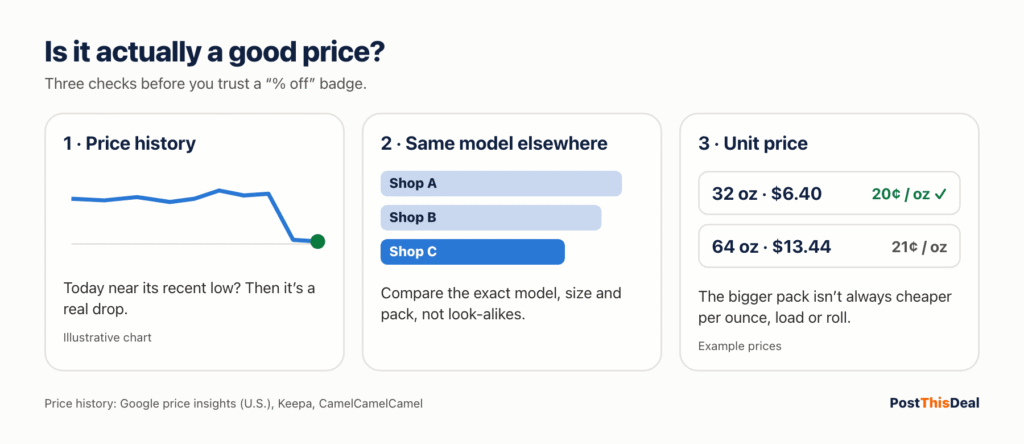
Look at the price history
- Google price insights: on many product pages in the U.S., Google labels the current price low, typical or high and shows how it moved in recent months. In Chrome, a shopping insights label can show the same on retailer pages.
- CamelCamelCamel and Keepa chart Amazon price history and send drop alerts. CamelCamelCamel is simpler; Keepa embeds detailed charts in Amazon pages and covers more marketplaces.
- Check the unit price for anything sold in packs or sizes: price per ounce, per load, per roll. The bigger pack isn’t always cheaper.
Read the deal, not the badge
- Who sells it? On Amazon and Walmart, the same listing can be sold by the retailer or a marketplace seller with different shipping and returns.
- What’s the condition? New, renewed, open-box and used are priced differently for a reason.
- What are the conditions? Clip coupons, Subscribe & Save, memberships, minimum spend and app-only prices all change who actually gets the price.
On PostThisDeal every deal page says what we know: the price as posted, whether we’ve re-checked it with the shop, and the conditions attached. Prices change; the shop’s page is always the final word.
6. Browser extensions: useful, but know what they do
Shopping extensions fall into four groups. Most are free because they earn affiliate commission when you buy, so it’s worth knowing which kind you’re installing and what it can see.
| Type | What it does | Examples | Watch out for |
|---|---|---|---|
| Price history | Charts past prices and alerts you to drops | Keepa, CamelCamelCamel, Chrome shopping insights | Usually one store or region only |
| Price comparison | Shows the same product at other shops while you browse | Google Shopping, retailer-run comparison extensions | Matches can be the wrong size or model |
| Coupon finders | Tries codes at checkout | Various | Codes often fail; some take affiliate credit for sales they didn’t create |
| Cashback | Returns a share of the store’s commission | Card-linked and portal-based programs | Payouts can be delayed or reversed by returns |
The coupon-extension lesson. In late 2024, creators accused the PayPal Honey extension of replacing other people’s affiliate tracking at checkout. Google then tightened its Chrome Web Store rules in 2025: extensions must disclose affiliate programs and may only apply affiliate links, codes or cookies after a user action that benefits the user (coverage). Choose extensions with clear disclosures and minimal permissions.
- Check the permissions before installing. “Read and change all your data on all websites” is a lot of trust.
- Fewer is better. Two coupon extensions fight over the same checkout.
- Prefer tools you open on purpose (a site, an app, Lens) over ones that run on every page.
7. Spot fake shops and too-good-to-be-true deals
Scam shops copy real brands’ photos and run ads with impossible prices. They’re easy to avoid once you know the signs.
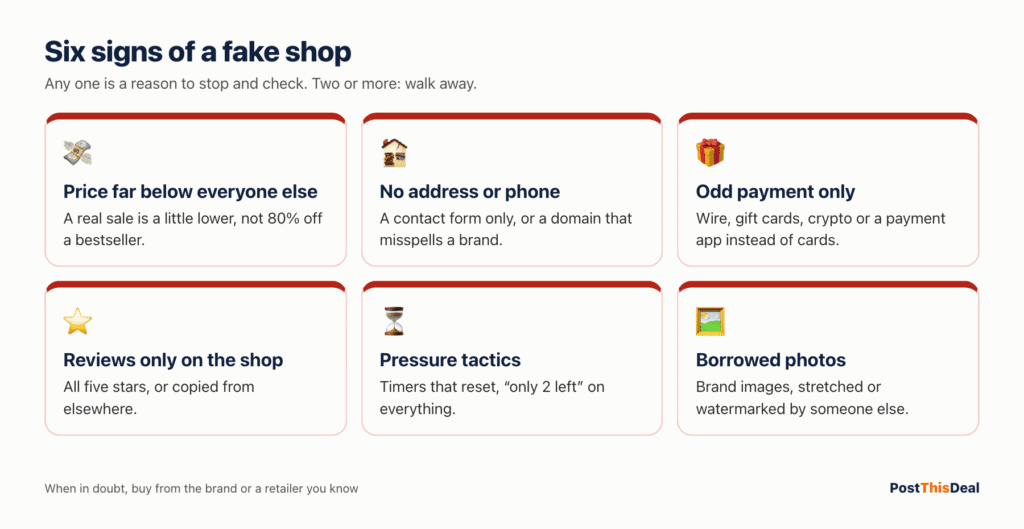
- The price is far below every other seller. A real clearance is a little lower, not 80% lower on a current bestseller.
- The shop is new to you and hard to verify: no physical address, no phone, a contact form only, a domain that misspells a brand.
- Payment only by wire, gift card, crypto or a payment app. Legitimate shops accept cards.
- Reviews are only on the shop itself, all five stars, or copied from elsewhere. Search the shop’s name with “reviews” or “scam”.
- Pressure: countdown timers that reset, “only 2 left” on every item.
If something feels off, buy from the brand or a retailer you know, even for a few dollars more. The FTC’s scam advice has more on recognising scams.
8. The real price: shipping, tax, memberships and returns
The cheapest sticker often isn’t the cheapest order. Before you choose a shop, add up what you’ll actually pay and what it costs if it goes wrong.
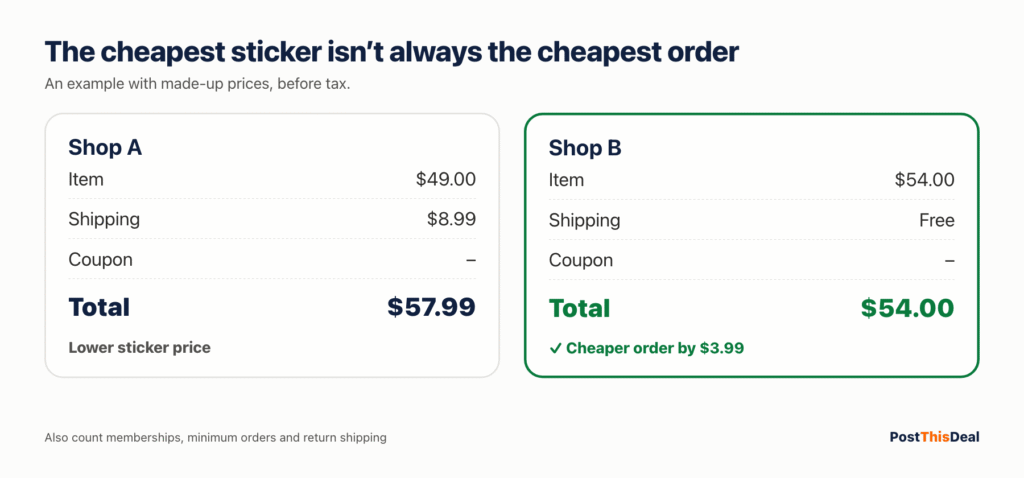
- Shipping: free-shipping thresholds, membership-only free shipping, and bulky-item fees.
- Tax: applies to most online orders now; it doesn’t make one shop cheaper than another for the same delivery address, but it matters against shelf prices.
- Memberships: Prime, Walmart+, Target Circle and warehouse clubs can unlock prices, but the fee counts. Our Costco membership guide does the maths for one example.
- Returns: return shipping, restocking fees and short windows can erase a small saving.
9. Where to buy, category by category
Every category has its own traps. Use this as a starting map, then let Lens and price history do the comparing.
| Category | Where to look first | What to check before you buy |
|---|---|---|
| Electronics & gadgets | Big-box electronics stores, Amazon, Walmart, the brand’s own store, refurbished programs | Exact model and year, warranty (manufacturer vs seller), “renewed” grade, return window |
| Appliances | Home improvement stores, big-box retailers, the brand | Model number on the spec sheet, delivery and haul-away fees, installation, energy rating |
| Groceries & household | Warehouse clubs, Walmart, Target, Amazon Subscribe & Save, the grocery store app | Unit price (per ounce, load, roll), membership cost, minimum orders |
| Fashion & shoes | The brand, department stores, off-price and outlet stores, resale platforms | Size charts, fabric, final-sale rules, return shipping |
| Beauty | Beauty retailers, the brand, department stores | Authorised sellers only (expired or counterfeit stock is common on marketplaces), shade, batch date |
| Furniture & decor | Home retailers, the brand, marketplaces, local resale | Dimensions against your room, delivery tier, assembly, return costs for bulky items |
| Toys & baby | Big-box stores, Amazon, the brand | Age rating, safety recalls, genuine listings (knock-offs copy photos) |
| Designer & luxury | The brand and authorised boutiques, authenticated resale | Authentication policy, condition grade, returns; no authenticity claim from looks alone |
10. Sold out, discontinued or impossible to find
When the exact item has vanished, widen the search step by step instead of giving up.
- Search the model number with “discontinued”, “replacement” or “successor”. Brands often replace a product with a near-identical one under a new number.
- Check refurbished and open-box channels: the brand’s own refurbished store, retailer open-box sections, and certified renewed programs.
- Look at resale marketplaces for used or new-old-stock, and check recently sold listings (not asking prices) to see what it’s really worth.
- Set an alert with a price tracker or the retailer’s back-in-stock notice.
- Ask the community. Someone may have seen it in a store; post it on the PostThisDeal Community.
- Accept a close match. For clothes and decor, Style Lens and Home Lens find the same look from what’s actually in stock.
11. Check local stock before you drive
- Use the store’s app or website and set your local store: most big retailers show aisle location and in-store stock.
- Search with your city (“in stock near me”): Google can show local availability for some products from participating stores.
- Call ahead for big purchases. App stock counts are estimates; ask the store to hold it.
- Order online for pickup when the online price is lower: many stores honour their own website price for pickup orders.
12. Marketplace and overseas sellers
Marketplaces (Amazon, Walmart Marketplace, eBay, Temu, Shein, AliExpress and others) can be the cheapest place to buy, and the riskiest. The listing page tells you who you’re really buying from.
- Read “sold by” and “ships from”. A product sold and shipped by the retailer usually has the simplest returns.
- Check the seller’s rating and history, not just the product reviews, which can be merged from other listings.
- Delivery times and returns from overseas sellers can be long; return shipping may cost more than the item.
- Specifications drift: sizes, voltages and materials on cheap listings don’t always match the photos.
13. When to buy
Big sale events (Prime Day, Black Friday and Cyber Monday, back-to-school, end-of-season clearance) bring real discounts, but not on everything, and some “deals” are ordinary prices with a badge. Rather than trusting the calendar, check the item’s price history: if today’s price matches its recent lows, it’s a good time; if not, set an alert and wait. Our hot deals and ending-soon list show what’s moving right now.
A checklist before you buy
- I know the exact brand, model, size, colour and pack count.
- I compared at least three sellers, including the brand and a big retailer.
- I compared the total: price, shipping, tax, coupons I can actually use.
- The “was” price is believable (price history checked for big purchases).
- The seller is the retailer or a reputable marketplace seller.
- The shop is real: contact details, card payments, outside reviews.
- I know the return window and who pays return shipping.
Find where to buy it, now
Start with whatever you have: a photo, a screenshot, a link or a barcode. Lens finds the shops; you decide.
Frequently asked questions
How do I find where to buy something from a picture?
Use a visual search: upload the photo or screenshot to PostThisDeal Lens, Google Lens or Amazon Lens. Crop to the product first and include any label or logo. Then confirm the exact model before comparing prices.
What’s the best free product finder?
It depends on what you start with. For a photo, try a visual search such as PostThisDeal Lens or Google Lens; for a link or model number, compare the same model across shops (Deal Lens, Google Shopping); in a store, scan the barcode (Store Lens). All of these are free to use.
How can I tell if a price is actually a deal?
Check its price history (Google price insights in the U.S., or Keepa and CamelCamelCamel for Amazon), compare the same model at other shops, and look at the unit price for anything sold in packs. A “was” price nobody charged recently isn’t a saving.
Can I find the exact item from a TikTok or Instagram video?
Often, yes: pause on the clearest frame, screenshot it, crop to the product and run a visual search. Check the caption and comments for a brand or link. If the exact piece is gone, Style Lens finds similar items at your budget.
Are shopping extensions safe?
Many are, but they can see the pages you visit. Install few, check their permissions, prefer ones that disclose how they earn money, and remove any you don’t use. Since 2025, Chrome’s store rules require extensions to disclose affiliate programs and apply affiliate links only after a user action.
How do I avoid fake websites when shopping?
Be wary of prices far below every other seller, shops with no address or phone, payment only by wire, gift card or crypto, and reviews that only appear on the shop itself. When in doubt, buy from the brand or a retailer you know.
Does PostThisDeal check the prices it shows?
Every deal says what we know: the price as posted and whether it has been re-checked with the shop. Prices change, so the shop’s page is always the final word. Some links are affiliate links; they never change your price or which deals rank first.
Keep going
- Handpicked live deals: deals our team posts by hand, all day.
- Hot deals and ending soon: what’s moving right now and what ends soon.
- Promo codes: codes with their conditions.
- PostThisDeal Community: real shoppers’ online deals, in-store finds and honest experiences (join free).
- Our WhatsApp channel: deal alerts on WhatsApp.
- The PostThisDeal blog: more guides from the team.